
Blog
Best Refurbished Dell OptiPlex Gaming PCs Under a Tight Budget

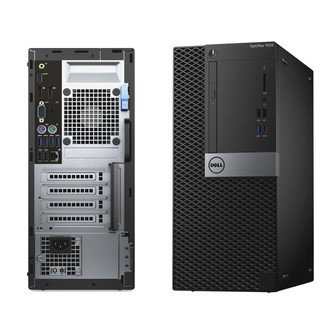
Best Refurbished Dell OptiPlex Gaming PCs Under a Tight Budget is a buyer-focused guide for shoppers comparing real products available from ComputaHardware. The goal is to match demand in the market with the exact product pages you can open, compare, and buy from the store.
Value gaming desktops attract demand when new GPU systems get expensive and buyers still want a dedicated graphics card.
This guide focuses on Dell OptiPlex Gaming Desktop (Intel i5-8500, GTX 1050 Ti, Dual Storage), Dell OptiPlex Gaming Desktop (Intel i7-8700, GTX 1050 Ti, Dual Storage), Dell OptiPlex Gaming Desktop (Intel i7-8700, AMD RX 550), and Dell OptiPlex 7080 Micro Desktop (Intel i5-10500, 512GB). It is written for entry gaming, school desks, living-room PCs, and budget Windows desktops, with practical notes on what to compare before choosing a configuration.
Shop the Products Mentioned
- Dell OptiPlex Gaming Desktop (Intel i5-8500, GTX 1050 Ti, Dual Storage) – best for value gaming buyers who want dedicated graphics and lots of storage.
View product - Dell OptiPlex Gaming Desktop (Intel i7-8700, GTX 1050 Ti, Dual Storage) – best for shoppers who want a stronger CPU in a refurbished GTX 1050 Ti gaming desktop.
View product - Dell OptiPlex Gaming Desktop (Intel i7-8700, AMD RX 550) – best for buyers who want a stronger refurbished CPU with entry dedicated graphics.
View product - Dell OptiPlex 7080 Micro Desktop (Intel i5-10500, 512GB) – best for offices that want the OptiPlex Micro form factor with more starting SSD capacity.
View product
Why This Category Has Demand
In 2026, PC buyers are being more selective. Memory and storage costs, Windows 11 refresh cycles, AI-capable hardware, GPU availability, compact desk setups, and creator workflows all affect what people search for. That makes buyer-intent content useful: a shopper may not start with a brand name, but they often start with a problem such as local AI, a small office desktop, a faster dock, a NAS for backups, or a gaming tower that is already built.
That is why the strongest product posts should do more than repeat specifications. They should explain who each product is for, what tradeoffs matter, and where the reader should click next. The products below are selected because they connect to categories with visible demand: AI PCs, mini PCs, GPUs, NAS storage, docking, compact workstations, and value refurbished desktops.
Products Worth Comparing
Dell OptiPlex Gaming Desktop (Intel i5-8500, GTX 1050 Ti, Dual Storage)
Dell OptiPlex Gaming Desktop (Intel i5-8500, GTX 1050 Ti, Dual Storage) is best for value gaming buyers who want dedicated graphics and lots of storage. The listing highlights Intel i5-8500, NVIDIA GTX 1050 Ti, 16GB DDR4, 1TB SSD, and 2TB HDD. For an affiliate-style comparison, the key question is not just whether the spec sheet looks strong, but whether the product fits the job the buyer repeats every week.
Dell OptiPlex Gaming Desktop (Intel i7-8700, GTX 1050 Ti, Dual Storage)
Dell OptiPlex Gaming Desktop (Intel i7-8700, GTX 1050 Ti, Dual Storage) is best for shoppers who want a stronger CPU in a refurbished GTX 1050 Ti gaming desktop. The listing highlights Intel i7-8700, NVIDIA GTX 1050 Ti, 16GB DDR4, 1TB SSD, and 1TB HDD. For an affiliate-style comparison, the key question is not just whether the spec sheet looks strong, but whether the product fits the job the buyer repeats every week.
Dell OptiPlex Gaming Desktop (Intel i7-8700, AMD RX 550)
Dell OptiPlex Gaming Desktop (Intel i7-8700, AMD RX 550) is best for buyers who want a stronger refurbished CPU with entry dedicated graphics. The listing highlights Intel i7-8700, AMD Radeon RX 550, 16GB DDR4, and 1TB SSD. For an affiliate-style comparison, the key question is not just whether the spec sheet looks strong, but whether the product fits the job the buyer repeats every week.
Dell OptiPlex 7080 Micro Desktop (Intel i5-10500, 512GB)
Dell OptiPlex 7080 Micro Desktop (Intel i5-10500, 512GB) is best for offices that want the OptiPlex Micro form factor with more starting SSD capacity. The listing highlights 10th Gen Intel Core i5-10500, Intel UHD Graphics 630, 16GB DDR4, and 512GB SSD in a micro desktop. For an affiliate-style comparison, the key question is not just whether the spec sheet looks strong, but whether the product fits the job the buyer repeats every week.
How to Choose Before You Click Buy
Start with the workload. Gaming, local inference, file storage, video editing, office productivity, and home media all stress hardware differently. A GPU-heavy buyer should focus on graphics memory and platform support. A mini PC buyer should focus on processor class, memory, storage, noise, ports, and display support. A NAS buyer should think about drive layout, networking, capacity, and backup habits.
Next, check the space and setup. Compact systems are attractive because they clean up a desk, but small computers still need airflow, practical cable routing, and the right monitor connections. Docks and storage companions are useful when the computer itself has limited expansion, while larger towers are better when the buyer expects more internal upgrade room.
Finally, use the product pages for current availability, configuration details, and pricing. Blog posts are best for narrowing the shortlist; product pages are where the live store information belongs. Open each linked product, compare the listed specs, and choose the model that solves the actual job rather than the one with the longest list of features.
Affiliate-Style Recommendation
If you are shopping for entry gaming, school desks, living-room PCs, and budget Windows desktops, start with the linked ComputaHardware products in the list above. They give you a focused shortlist inside a demand-heavy category, and each product page has the current listing details needed to make the final decision.
For most buyers, the right move is to choose the product that matches the main workflow first, then optimize around nice-to-have features. Extra ports, more memory, faster storage, and higher-end graphics are valuable when you will use them. When you will not, a simpler system can be the smarter purchase.
Bottom Line
The products in this guide are worth comparing because they sit inside a market category people are actively shopping in 2026. Use the links above to view the ComputaHardware product pages, compare configurations, and decide which option fits your desk, workload, and budget.

