
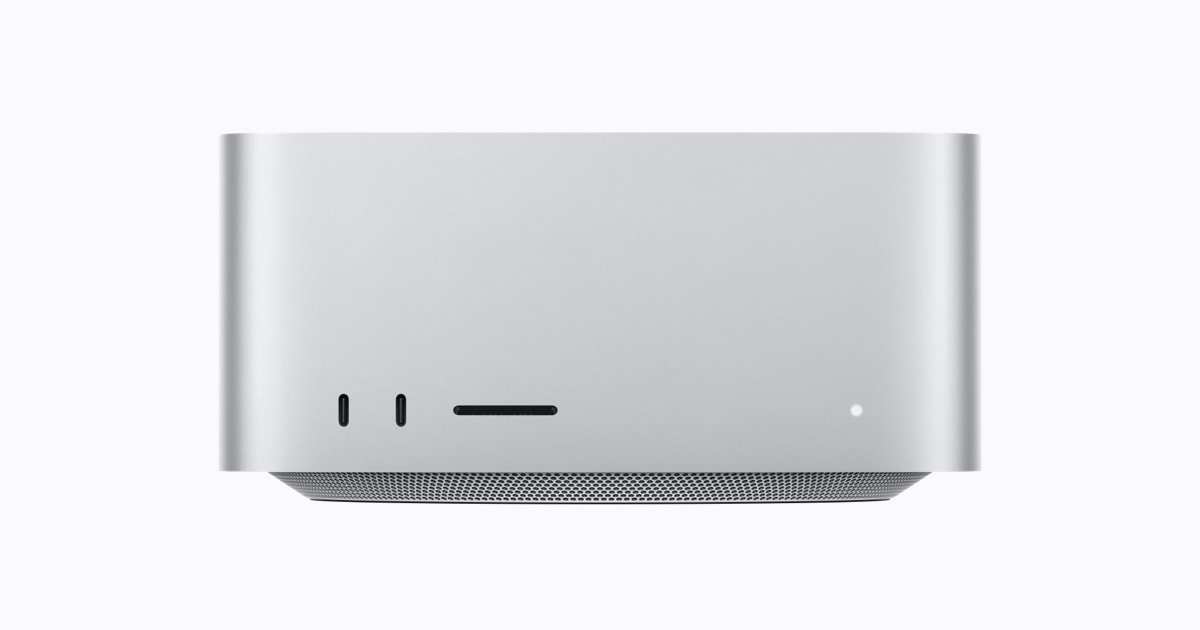





Apple Mac Studio (M5 Ultra)
Price range: $5,499.00 through $14,299.00
Apple’s most powerful desktop: up to 36-core CPU, 80-core GPU, 512GB unified memory.
The Mac Studio with M5 Ultra is the most powerful desktop Apple has ever shipped, and it exists for one reason: to remove the ceiling on what a single machine can do. Built around Apple’s UltraFusion architecture, M5 Ultra fuses two M5 Max chips into a single system-on-chip with 1.2TB/s of unified memory bandwidth, delivering a major generational leap in CPU and GPU throughput over the outgoing M3 Ultra. For studios rendering feature-length timelines, AI teams running enormous local language models, and engineers who need serious compute without a server room, this is the machine that stops you waiting.
Key Features
- Up to 36-core CPU — 12 new “super core” high-performance cores plus 24 power-efficient performance cores, Apple’s newest three-tier core architecture built for sustained, all-day workloads.
- Up to 80-core GPU — the largest GPU Apple has ever fitted to a Mac, with hardware-accelerated ray tracing and mesh shading for real-time 3D and colour-accurate video work.
- Up to 512GB unified memory — CPU, GPU, and Neural Engine share one giant, ultra-fast memory pool, letting you load 200B+ parameter local AI models entirely in memory instead of streaming from disk or the cloud.
- 1.2TB/s memory bandwidth — keeps every core fed simultaneously, which is exactly what large models, 8K timelines, and simulation workloads demand.
- 32-core Neural Engine — dedicated silicon for on-device machine learning, accelerating everything from Core ML inference to Apple Intelligence features.
- Six Thunderbolt 5 ports (two front, four rear) at up to 120Gb/s each, plus 10-Gigabit Ethernet, HDMI 2.1, an SDXC card slot, and a 3.5mm headphone jack.
- Drives up to eight external displays — genuinely rare in a desktop this compact, and built for multi-monitor production and trading setups.
- Wi-Fi 7 and Bluetooth 6 for the fastest wireless standards currently shipping, plus a whisper-quiet thermal system even under sustained full load.
Built for Local AI, Not Just Creative Work
The headline reason professionals buy the top-spec Mac Studio in 2026 isn’t editing — it’s AI. With up to 512GB of unified memory, M5 Ultra can hold enormous open-weight language and multimodal models entirely in RAM, running inference locally with no per-token API costs, no data leaving the building, and no dependency on a third party’s uptime. For legal, healthcare, defence, and financial teams handling sensitive data, that’s not a nice-to-have, it’s the whole point. Researchers fine-tuning models, agencies building AI-powered products, and developers prototyping against local LLMs all get desktop-class throughput without racking a GPU server.
That same architecture happens to be exceptional for traditional pro workloads. Colourists can grade multiple streams of 8K ProRes RAW without dropping frames. 3D artists get GPU headroom for Octane, Redshift, and Blender Cycles renders that would otherwise need a dedicated render farm. Audio engineers can run hundreds of plugin instances across a session without touching the CPU meter. And because macOS scales cleanly across every core and both GPU tiers, none of this needs special configuration — it simply works.
Mac Studio is also a genuinely different proposition to an equivalent PC workstation on running costs: it draws a fraction of the power of a multi-GPU tower under load, needs no separate cooling infrastructure, and stays quiet enough to sit on a desk rather than in a server closet. For studios and businesses weighing a Mac Studio against cloud AI compute or a custom PC build, the total cost of ownership over three to five years is frequently the deciding factor, not just the spec sheet.
Specifications
- Chip: Apple M5 Ultra (quad-die UltraFusion, two M5 Max dies)
- CPU: 30-core (10 super cores + 20 performance cores) standard, or 36-core (12 super cores + 24 performance cores)
- GPU: 64-core standard, configurable to 80-core
- Neural Engine: 32-core
- Unified memory: 96GB standard, configurable to 256GB or 512GB
- Memory bandwidth: 1.2TB/s
- Storage configurations available: 1TB, 2TB, 4TB, or 8TB SSD
- Ports: 2x Thunderbolt 5 (front) + SDXC card slot, 4x Thunderbolt 5 (rear), HDMI 2.1, 10Gb Ethernet, 3.5mm headphone jack
- Display support: up to 8 external displays
- Wireless: Wi-Fi 7, Bluetooth 6
- Dimensions: 7.7 x 7.7 x 3.7 inches
- Weight: 8.0 lbs (3.6kg)
- Maximum continuous power: 480W
- Operating system: macOS
| Configuration | 96GB RAM / 1TB SSD — 30-Core CPU, 64-Core GPU, 96GB RAM / 2TB SSD — 30-Core CPU, 64-Core GPU, 96GB RAM / 4TB SSD — 36-Core CPU, 80-Core GPU, 256GB RAM / 4TB SSD — 36-Core CPU, 80-Core GPU, 256GB RAM / 8TB SSD — 36-Core CPU, 80-Core GPU |
|---|
17 reviews for Apple Mac Studio (M5 Ultra)
Related products


Apple Mac mini (M4 Pro)
Price range: $1,399.00 through $2,799.00

Apple Mac Studio (M3 Ultra)
Price range: $3,999.00 through $9,699.00

Apple MacBook Pro (M5 Max)
Price range: $3,599.00 through $6,199.00


Beelink GTi14 Ultra AI PC Intel® Core™ UItra 9 185H (OpenClaw Pre-Installed)
Price range: $1,099.00 through $1,399.00

Beelink SER10 MAX AMD Pro Ryzen™ AI 9 HX 470 (OpenClaw & Local LLM Pre-installed)
Price range: $1,339.00 through $2,299.00

Pre-installed OpenClaw SSD Upgrade Kit
Price range: $189.00 through $529.00

Rosalind T. –
Podcast studio with four camera feeds and simultaneous multitrack recording running through this without breaking a sweat. Driving my displays plus recording gear off the one box has simplified our whole setup.
Benedikt S. –
Bioinformatics workloads with huge in-memory datasets fly on this, the bandwidth is the whole reason I bought it. Slight gripe is you commit to your storage and memory config at purchase, coming from a tower PC I miss being able to just add a drive myself later.
Hugo N. –
Genomics pipeline work benefits massively from the memory pool, jobs that used to need a cluster now run locally. Under a genuinely sustained 20+ hour compute job I did notice a very mild dip in clock speeds, not something that affects day to day use but worth knowing if you run marathon jobs.
Freya H. –
Running local inference on a 230B parameter model for a client research project and the unified memory just swallows it whole, no quantisation compromises needed. The 512GB config isn’t cheap but it replaced a rented cloud GPU instance we were paying for monthly, so it’s already paying for itself.
Daniel F. –
Switched our whole edit suite over from a Mac Pro tower and honestly this little cube keeps up with 8K ProRes timelines without breaking a sweat. Runs cool and quiet even with three streams playing back, and the Thunderbolt 5 ports mean my external RAID doesn’t bottleneck anything anymore.
Elena S. –
We replaced four separate render boxes in our small post house with two of these and the studio is noticeably quieter now. Colleagues keep asking if it’s even switched on, that’s how little fan noise there is under load.
Naomi K. –
Logic Pro session with well over 150 tracks, dozens of plugins, and it doesn’t even spin the fans up audibly in my treated room. For a home studio where mic bleed from fan noise used to be a real issue, this has been a revelation.
Willa F. –
Came from a loud PC tower under my desk doing motion graphics freelance work and the difference in noise alone was worth the upgrade, before you even factor in the speed. Small footprint means it actually fits on my desk instead of on the floor.
Idris C. –
Bought two of these for our small team and the performance is not in doubt. What caught us out was the lead time on the higher memory configurations, we waited longer than expected for delivery, so if you’re on a deadline order well ahead of when you actually need it.
Callum R. –
Performance is genuinely excellent for the video work I do, no complaints there. Where it stumbles is a couple of legacy Windows-only plugins I still rely on that simply won’t run, so I’ve had to keep an old PC around for those jobs, which wasn’t what I expected at this price point.
Callan W. –
It’s an exceptional machine and I don’t doubt the performance for a second, but the fully specced configuration is a serious amount of money for a small studio to justify, and I did have a moment of buyer’s remorse looking at the invoice. Ask me again in a year and I suspect I’ll have made peace with it.
Marcus W. –
Fantastic for 3D rendering and motion graphics, the ray tracing engine chews through Cinema 4D scenes that used to take overnight. Only knocking off a star because the price with a decent memory upgrade is genuinely eye watering, worth budgeting carefully before you configure one.
Theo M. –
We replaced three ageing render nodes with two of these for our VFX pipeline and the studio is noticeably quieter now, plus queue times have dropped enormously. Genuinely changes how we schedule overnight renders.
Amara D. –
Performance is honestly not in question, it chews through everything I throw at it. What knocked a star off is that a couple of my older audio plugins needed vendor updates before they’d run natively, so I was stuck in Rosetta for a few weeks waiting on patches.
Lucas B. –
Grading 8K RED footage in Resolve and the timeline scrubs without a single dropped frame, even with heavy noise reduction nodes stacked. Only reason it’s not five stars is I’d like one more Thunderbolt port on the front for quick card reader swaps, the rear ports are a stretch under my desk.
Priya N. –
Bought the 256GB unified memory config specifically to run larger local LLMs for a client project without shipping their data off to the cloud. It handles models that would need a rack of GPUs elsewhere, and the power draw is a fraction of what our old workstation used.
Ines P. –
Doing architectural visualisation and the real-time ray traced previews in our viewport are close enough to final render that we’ve cut client review cycles down significantly. Genuinely changed our workflow.